Why a Back to School Flyer Design Template Can Streamline Your Marketing This Season
Creating effective promotional materials under tight deadlines is a challenge many professionals face, especially during the busy back-to-school season. Whether you are an educator announcing new programs, a retail manager launching a sale, or a community organizer recruiting volunteers, your message needs to be clear, polished, and ready to share quickly. A back to school flyer design template serves as a practical starting point that saves time while ensuring your final piece looks professional and meets print specifications. Rather than starting from a blank canvas, you gain a structured layout that you can adapt to your specific audience and goals.
Understanding the Back to School Flyer Design Template
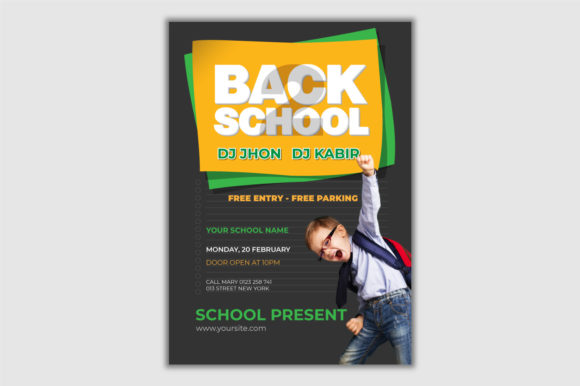
This specific template is a vector-based file created in Adobe Illustrator, sized at A4 format (8.27 x 11.69 inches) with a standard 0.125-inch bleed. It operates in CMYK color mode at 300 DPI resolution, which means your printed flyers will reproduce colors accurately and appear sharp, whether you are printing a small batch on a desktop printer or sending the file to a commercial print shop. The template includes editable text layers so you can replace placeholder copy with your own headlines, dates, calls to action, and contact information.
One important detail to note is that the images shown in the demo are for preview purposes only and are not included in the final file. This is common with professional templates, as it allows you to insert your own photography or graphics that align with your brand. Because the file uses free fonts, you can download the same typefaces without additional cost, keeping your production budget predictable.
Common Challenges When Producing Back-to-School Flyers
Many professionals encounter similar obstacles when creating seasonal marketing materials. Without a template, you may spend hours adjusting margins, aligning elements, or troubleshooting color settings. Print specifications like bleed, resolution, and color mode can be confusing, especially if you do not work with print design every day. A flyer that looks great on screen may print with unexpected color shifts or cropped edges if these details are overlooked.
Another challenge is maintaining consistency across multiple pieces. If you are producing a series of flyers for different grade levels, store locations, or event dates, starting from scratch each time makes it difficult to keep a cohesive look. Time constraints add pressure, and the need to balance accuracy with speed can lead to last-minute errors.
Additionally, sourcing high-quality images that align with your message can be costly and time-consuming. The demo images in the template give you a visual reference, but you have the freedom to replace them with your own photos or stock images that better represent your unique audience.
How This Template Addresses Your Needs
The back to school flyer design template solves these challenges by providing a pre-built framework where the technical details are already handled. The bleed is set correctly, the resolution meets print standards, and the color mode is ready for professional output. You can focus on your message rather than troubleshooting layout issues.
Because the text layers are editable, you can update every word in the flyer without affecting the design structure. This is particularly useful when you need to create variations for different audiences. For example, a school district might use the same template to promote elementary, middle, and high school events, simply swapping out the headline and supporting details. A retail store could create separate flyers for uniform sales, supply promotions, and open house events while keeping the overall look consistent.
The vector format also gives you flexibility. You can scale elements, change colors to match your brand palette, and rearrange components without losing quality. If your organization uses specific fonts or a custom logo, you can integrate those assets seamlessly. The free fonts included in the template reduce the risk of missing typefaces when handing off the file to a print provider.
Practical Applications for Different Users
How you use this template will depend on your role and the goals of your flyer. Here are a few common scenarios.
Educators and School Administrators
If you work in a school, your back-to-school flyer might need to announce orientation dates, supply lists, transportation changes, or extracurricular sign-ups. Using the template, you can quickly produce a flyer that parents and guardians will find easy to read and visually appealing. Because the template is print ready, you can order physical copies to send home with students or display in hallways and community spaces. The A4 size is standard for school communications and fits well in bulletin boards and handout stacks.
Retail and Business Owners
For retailers running back-to-school sales, time is of the essence. You need to get your offer in front of customers before the season passes. The template allows you to create a product sale poster that highlights discounts, bundle deals, or loyalty rewards. You can customize the headline to capture urgency and include your store hours and location. Because the template is vector based, you can also repurpose it for digital use, such as social media posts or email newsletters, by exporting a version in RGB mode.
Community Organizations and Nonprofits
Organizations that support students and families during the back-to-school period often need to promote backpack drives, vaccination clinics, or after-school programs. The template gives you a professional foundation even if you do not have a dedicated design team. You can add your organization's logo, include a QR code linking to a registration form, and print the number of copies you need without overspending on design services.
Freelancers and Small Business Marketers
If you provide design or marketing services to multiple clients, this template can become a reliable asset in your workflow. You can use it as a starting point for different clients, adjusting colors, fonts, and imagery to reflect each brand. The editable layers make it easy to generate several versions quickly, allowing you to offer fast turnaround times during the busy season.
Practical Recommendations for Getting the Most from the Template
To ensure your final flyer meets your expectations, it helps to approach the customization process with a clear plan. Start by gathering all the content you want to include, such as your headline, body text, dates, location, and call to action. Having this information ready will speed up your editing and reduce the chance of multiple revisions.
When replacing placeholder text, pay attention to the length of your copy. The template's text layers are sized for a certain amount of content. If your text is significantly longer or shorter, you may need to adjust the font size or spacing slightly to maintain visual balance. The same applies to images. Choose photos that have a similar orientation and focal point as the demo images to ensure they fit well within the layout.
Because the template is set to CMYK color mode, keep in mind that colors on your monitor may look slightly different when printed. If you are new to print design, request a proof from your print provider before running a full batch. This small step can save you from wasting paper and ink on a design that does not translate perfectly to the printed page.
If you plan to use the flyer digitally, you will want to create a copy and convert it to RGB color mode. The template's high resolution of 300 DPI is ideal for print, but for screen use, you can reduce the resolution to 72 or 150 DPI to keep file sizes manageable without sacrificing visual quality.
Expected Outcomes and Benefits
Using a well-prepared template like this one helps you produce a flyer that looks intentional and professional, even if your design experience is limited. Your audience will perceive the information as credible and organized, which can increase engagement and response rates. For educators, a clear flyer means fewer follow-up calls from parents. For retailers, it means more customers walking through the door during the sales window.
Time savings are another significant benefit. Instead of spending hours or even days on layout and print setup, you can complete your flyer in a fraction of the time. This allows you to focus on other priorities, such as coordinating events, managing inventory, or communicating with stakeholders.
Consistency across your materials also builds brand recognition. When families see the same visual style on multiple flyers, they begin to associate that look with your organization. Over time, this can strengthen trust and make your communications more effective.
Important Considerations Before You Start
Since the template does not include images, you will need to source your own. This gives you creative control but also requires planning. If you are using stock photography, choose images that reflect the diversity and spirit of your community. If you are using original photos, ensure they are high resolution and properly lit. Blurry or low-quality images can undermine the professional look of your flyer.
Also, confirm that the free fonts referenced in the template are compatible with your version of Adobe Illustrator. Download and install them before you begin editing to avoid missing font warnings. Most free font licenses allow commercial use, but it is wise to double-check the licensing terms if you plan to use the flyer for a for-profit venture.
Lastly, remember that the demo images are not included. This is standard practice for template providers, as it keeps file sizes smaller and gives you the flexibility to use your own visuals. Review the template file structure when you open it. You will likely see placeholder rectangles or gray boxes where images should go. Replace these with your own assets, and your flyer will be ready to print.
Adapting the Template for Different Audiences
The back to school flyer design template is versatile enough to serve a wide range of users. A school might use it to communicate with parents, while a tutoring center might adapt it to attract new students. A nonprofit could emphasize a community event, and a retailer could highlight a limited-time offer. The key is to match the tone and imagery to your specific audience.
For a school audience, use warm, welcoming language and images of students learning or playing. For a retail audience, emphasize value and urgency. For a community organization, focus on inclusivity and impact. The template's clean layout works well in all these contexts because it prioritizes readability and places the most important information at the center of attention.
If you are creating multiple flyers for the same season, consider saving a master file in Adobe Illustrator with your brand colors and logo already embedded. Then duplicate this file for each new flyer and update the text and images. This approach maintains consistency while saving even more time.
Final Thoughts on Using a Back to School Flyer Design Template
When the back-to-school season arrives, the last thing you want is to be slowed down by technical design issues. The right flyer template removes these barriers and lets you communicate your message effectively. By starting with a file that already meets print standards, you reduce the risk of errors and ensure that your final piece looks as good on paper as it does on your screen.
Whether you are a teacher, a store owner, or a community leader, the ability to produce a polished, print-ready flyer in a short amount of time is a practical advantage. You can allocate your energy toward what matters most, serving your students, customers, or community members. With a well-designed template as your foundation, your back-to-school communications will be ready when you need them.